Main Page · Errors
You may not need this.
The
Community Patch does not
rely on the legacy components, so if you are installing it you can skip the whole
procedure below. This page is for running the game without the patch.
MTM2
Windows 10 Game not starting solution
Why the guide?
Although Windows 10 has support for many old games, the option is not turned on right out of the box. However there's a simple solution.
Turn on Legacy Components
- All you need to do is turn on the default Legacy Components and old game support will be enabled, including MTM2.
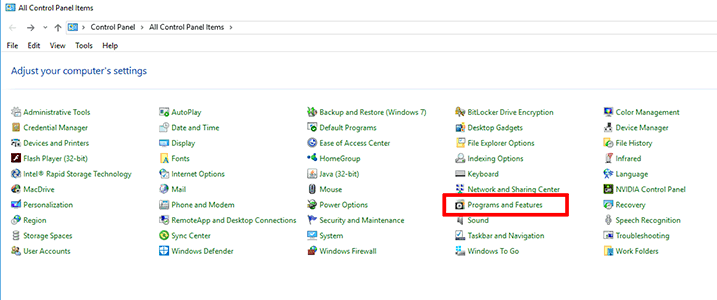
- First, open
control panel and then open
Programs and Features.
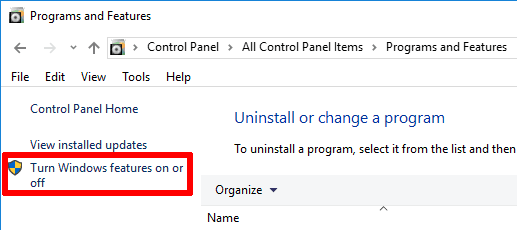
- Next, in
Programs and Features open
Turn Windows features on or off on the left side of the window. Don't worry about the shield icon.
- The
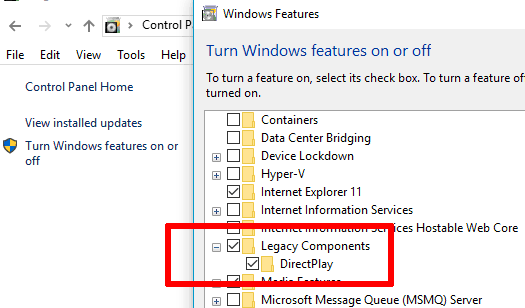
Windows Features window pops up. In here scroll down until you find
Legacy Components. Press the
plus sign to open the folder. Now you can see both
Legacy Components and
DirectPlay. Make sure they are both activated with a tick, just like in the picture below. Now press
OK and the game should work just fine.
Happy Gaming in Win 10!
That's it. Now you can once again play MTM2!